
CLI Reference
DevFix provides a powerful, single-binary CLI interface for analyzing and recovering broken environments.
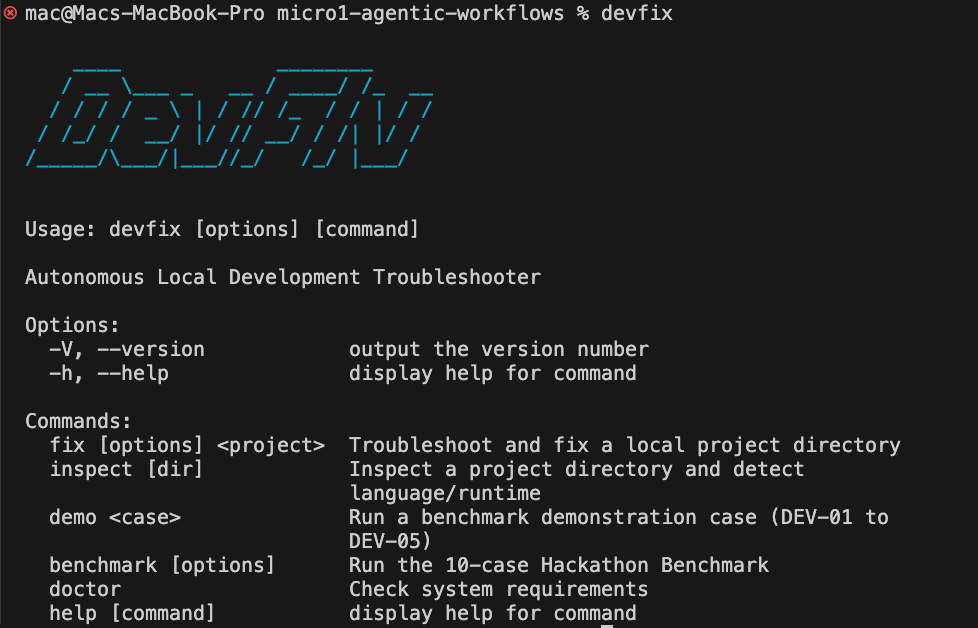
The DevFix interactive terminal interface.
Commands
devfix fix <project>
Troubleshoot and fix a local project directory. This is the core engine of DevFix.
- Behavior: Spins up a secure Docker sandbox, mounts the project, runs the build command, analyzes failures, and interactively patches the code until it compiles.
- Options:
--debug: Enable verbose debug logging.--timeout <ms>: Set a custom timeout for the sandbox execution.
devfix inspect [dir]
Inspect a project directory and automatically detect its language, runtime, package manager, and required sandbox environment.
- Behavior: Operates strictly in read-only mode. Excellent for verifying that DevFix correctly understands your repository's architecture before attempting a fix.
- Defaults: Inspects the current directory (
.) if no path is provided.
devfix benchmark
Run the complete 10-case Hackathon Benchmark suite.
- Behavior: Downloads and injects 10 intentionally broken projects into isolated sandboxes to test the LLM's recovery rate. Generates a detailed markdown and JSON report upon completion.
- Options:
--case <DEV-XX>: Run a specific benchmark case instead of the full suite.
devfix demo <case>
Run a visual demonstration of a specific benchmark case.
- Behavior: Operates identically to
benchmark --case, but streams the agent's internal thought process and terminal interactions directly to your CLI in real-time.
devfix doctor
Check system requirements and valid configurations.
- Behavior: Verifies that Docker is installed, the daemon is running, and that you have a valid LLM provider API key in your
.envor system environment variables.